Drag to rotate · Click a block
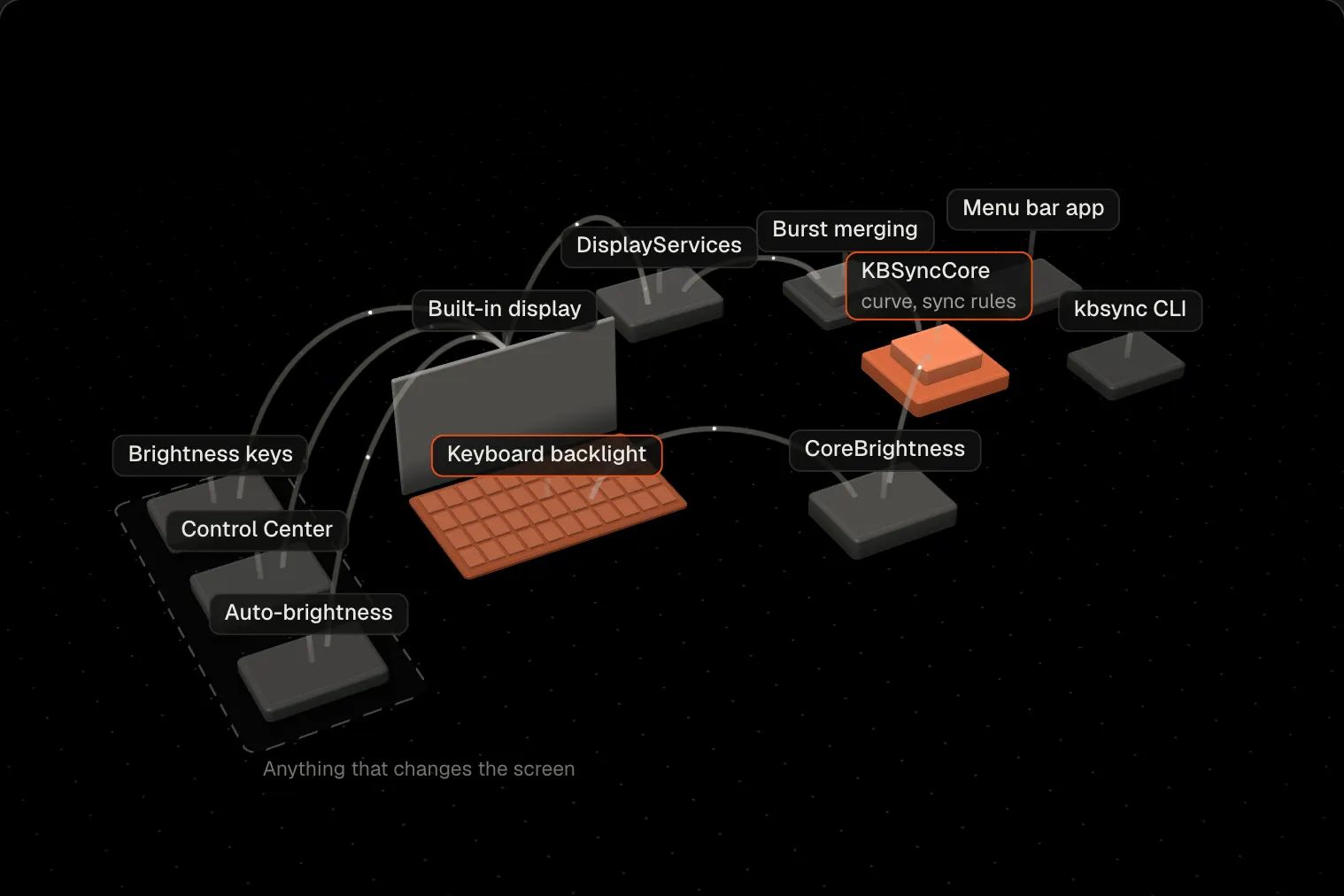
The laptop in the middle, and the loop that keeps its keyboard in step with its screen. Click any block to see what it does and where the code lives.
kbsync
A menu bar app and command-line tool in Swift that sets a MacBook's keyboard backlight from its screen brightness. It reacts to a brightness change in about 7 ms and uses no CPU between changes.
Results
Reaction time
7 ms
From the screen changing to the keyboard following, on an M1 Pro running macOS 26.6.
Wakeups while idle
0
0.0% CPU for both the app and the command-line tool. It doesn't poll.
Memory
4.6 MB
For the command-line tool. The menu bar app uses about 13 MB.
Leaks
0 bytes
Memory was unchanged after a stress test of 20,000 brightness changes.
Problem
On Apple Silicon MacBooks the screen and keyboard backlight are set separately, so turning the screen down at night leaves the keyboard bright.
Neither has a public API. Polling would have to run ten or more times a second to feel instant, for a value that changes a few times an hour, so kbsync waits for change notifications instead.
What I built
- Changekeys, Control Center, auto-brightness
- NotifyDisplayServices wakes the process
- Mergea burst becomes one handler call
- Curvemin + (max − min) × screen^gamma
- FadeCoreBrightness sets the keyboard
kbsync loads two private frameworks at runtime with dlopen. DisplayServices posts a system-wide notification whenever any process changes the screen brightness. CoreBrightness sets the keyboard level through the same API the Control Center slider uses.
Brightness keys, Control Center, auto-brightness and other apps all trigger the same notification. kbsync maps the new level through a curve set with --min, --max and --gamma, then fades the keyboard to match.
While it runs, kbsync turns off “Adjust keyboard brightness in low light” so the light sensor doesn’t fight it, and turns the setting back on when it exits. The display’s own auto-brightness stays on, so the keyboard still follows the room through the display.
The menu bar app and the command-line tool share one core. The curve, argument parsing and sync rules live in KBSyncCore, which doesn’t touch the hardware.
Design decisions
- Event-driven. The process sleeps until macOS sends a brightness notification, so it has 0 wakeups while idle.
- Bursts merged with a GCD data-add source. A held key or a dragged slider sends hundreds of notifications a second. Each one bumps the source, and GCD merges a burst into one handler call. Before this, a 5,000-change burst queued about 2,500 callbacks. Now it queues a handful.
- Every private selector checked first. Each goes through
responds(to:), so a macOS update that changes the API exits with a clear error instead of crashing. - Fake hardware in the tests. The core is unit tested against a fake display and keyboard. The private-framework bridges were checked on the real machine, down to the PWM register.
- The repo is its own Homebrew tap. One
brew tapand onebrew install, with no second repo to keep in sync.
Private API findings
setBrightness:fadeSpeed:commit:forKeyboard:is undocumented. I read the backlight’s PWM duty cycle from the IORegistry during afadeSpeed: 2000call and measured an even 2.0 second ramp, so the unit is milliseconds.- While macOS holds the backlight off after inactivity, writes succeed but have no effect. kbsync skips writes while the idle flag is set and syncs again when it clears.
- CoreBrightness also reports the backlight as suppressed whenever its level is 0%, and the next write turns it back on. An early version treated suppressed as idle, so the keyboard stayed off once the screen reached 0%. Now only the idle flag blocks writes.
- With “Adjust keyboard brightness in low light” on, the light sensor moved the keyboard from 24.5% to 24.0% with nothing else touching it. kbsync turns that setting off while it runs.
Measurements
On a MacBook Pro with an M1 Pro, running macOS 26.6:
| Measure | Result |
|---|---|
| Idle | 0 wakeups, 0.0% CPU (app and command line) |
| Memory | Command line about 4.6 MB, app about 13 MB |
| Leaks | None. Command-line memory was unchanged after 20,000 brightness changes |
| CPU per change | About 0.1 ms |
| Delay | About 7 ms |
Known limits
- The APIs are private, so a macOS update could break it. If something it needs is missing, kbsync exits and says what.
- Tested on an M1 Pro. Other Apple Silicon MacBooks should work, and Intel Macs are untested.
- The app isn’t signed with a paid Apple Developer ID, so the first launch needs “Open Anyway” in System Settings.
Run it
brew tap simar-s2/kbsync https://github.com/simar-s2/kbsync
brew install --cask simar-s2/kbsync/kbsync   # menu bar app
brew install simar-s2/kbsync/kbsync          # or the command-line tool
kbsync install # run in the background and at loginFaceMesh