Drag to rotate · Click a block
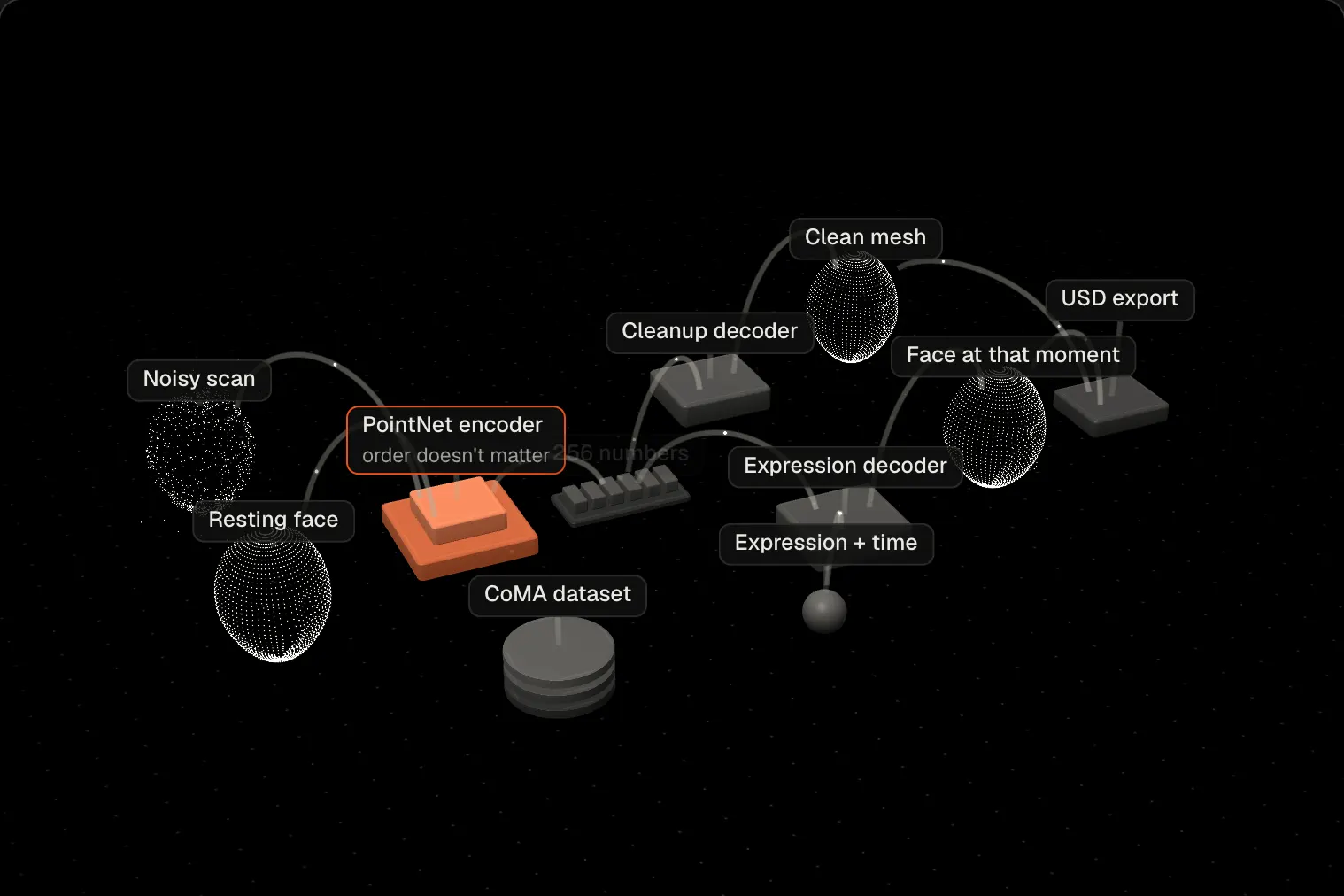
One encoder, two decoders. The point clouds are illustrations, not CoMA data. Click any block to see what it does and where the code lives.
FaceMesh
A PyTorch model with one PointNet encoder and two decoders. One animates a face from its neutral mesh and an expression. The other turns a noisy, unordered 3D scan into a clean mesh with a fixed vertex layout. Results export to USD and open in Blender.
Results
Scan cleanup, seen people
0.83 mm
Average error, against 4.32 mm for outputting the average face. About 5x better.
Expressions, seen people
0.45 mm
Against 1.41 mm for the baseline, the average movement for each expression. About 3x better.
Scan cleanup, new people
2.59 mm
On people left out of training, against 5.28 mm for the average face. About 2x better.
Training data
20,465
3D face meshes from the CoMA dataset, 12 people each making 12 expressions.
Problem
Raw face scans are unordered point clouds with noise, holes and stray points. Animation needs a mesh with a fixed layout, where each vertex always belongs to the same part of the face.
Both tasks depend on knowing what faces look like, so FaceMesh trains one shared encoder for both and measures each task against a simple baseline.
What I built
- Pointsa resting face or a noisy scan
- EncoderPointNet, order doesn't matter
- Code256 numbers describe the face
- Decodeexpression or cleanup head
- Meshsame layout for every face
- USDopens in Blender
The encoder is a PointNet. The same small network runs on every point, then a max over all points reduces them to one 256-number code. A max doesn’t depend on order, which is what unordered scans need.
Two decoders share that code. The expression decoder takes it with an expression and a time step, and predicts how far each vertex moves from its resting position. Asking for 60 time steps gives an animation. The cleanup decoder takes the code from a scan and predicts each vertex’s offset from the average face.
Training scans are simulated. I take a clean mesh from CoMA, cut a hole in it, add noise and stray points, and shuffle the points. The clean mesh is the target. The loss compares each predicted vertex with the real one, plus the mesh edge lengths so the surface stays smooth.
The repo includes a Docker image and a script that trains on an AWS GPU and copies the results to S3.
Results
Error is the average distance between predicted and real vertices, in millimeters. Lower is better. New people means 2 of the 12 were left out of training entirely. Seen people means every 10th frame was held out, but everyone appears in training.
| Tested on | Expression: baseline | Expression: model | Cleanup: average face | Cleanup: model |
|---|---|---|---|---|
| New people | 1.58 | 1.58 | 5.28 | 2.59 |
| Seen people | 1.41 | 0.45 | 4.32 | 0.83 |
Predicting how a new person’s face moves from only their resting face is the weak spot. With 10 people to train on, the model doesn’t beat the average movement. Without a correction it scored 1.90 mm, worse than the baseline. For new people I use --baseline_correction, which starts from the average movement and learns a correction on top, so it matches the baseline at 1.58 mm.
Training details
- No BatchNorm in the encoder. It sees both clean meshes and noisy scans, and the shared batch statistics fit neither.
- Each head is randomly stretched by up to 5% during training, which helped on people the model hadn’t seen.
- Meshes load with
trimesh.load(path, process=False). The default reorders vertices, which silently breaks the fixed layout.
Known limits
- With 12 people in the dataset, expressions for new people are no better than the baseline.
- Scans have to be in meters and facing forward.
- CoMA requires an access request, so the repo doesn’t include the data or trained weights.
Run it
python -m facemesh.train --data data/coma.npz --out_dir runs/coma_subject \
    --epochs 30 --baseline_correction

python -m facemesh.export_usd fit --checkpoint runs/coma_subject/best.pt \
--scan my_scan.ply --out_dir exports/my_scanQuizzera